


Time Warp Scan - Face Scanner
4.12.50K Reviews
App Specs
- Version
- 3.7.6
- Updated On
- License
- Free
- Downloads
- 10,000,000+
- Developer
- Braly JSC
- Categories
- Photography
- Platform
- Android, iOS
Screenshots
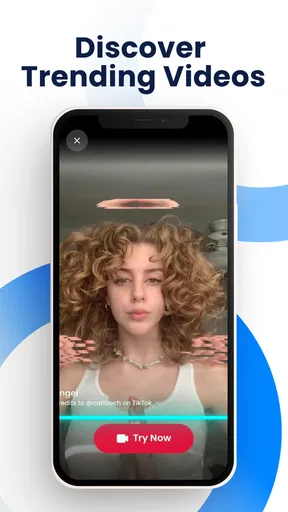
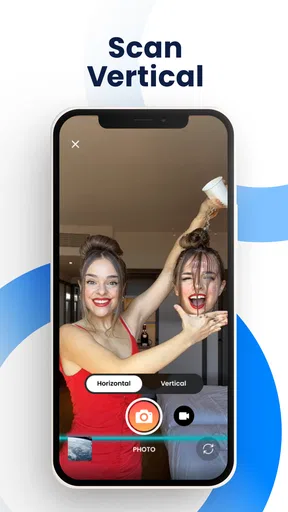
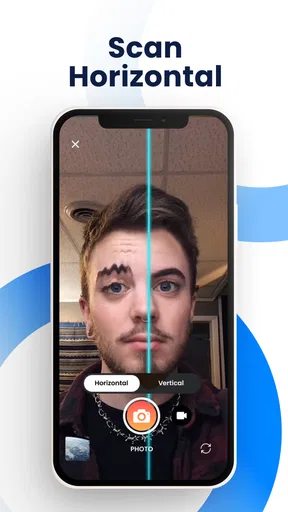
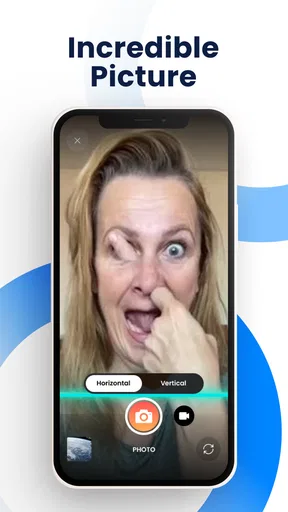
 Analysis by AppCompare
When I’m deciding whether to try a camera effect, I ask a simple question: will it help me make something I actually want to share, or will it be a novelty I forget after one use? Time Warp Scan - Face Scanner is firmly built around one playful idea: capturing a face, object, or movement as a scanning line travels across the frame. That makes it a good fit for quick experiments and silly clips, but not a replacement for a full photo editor or a camera app meant for carefully composed pictures.
I’d choose it when I want a visual gag that depends on timing rather than a polished portrait. If I’m taking a family photo, documenting an event, or trying to make an image look natural, I’d reach for a regular camera and editing workflow instead. The appeal here is the chance to play with distortion, see what happens, and share the result—not to fix a shot that came out imperfectly.
What to decide before you open the camera
The key choice is whether you enjoy experimenting in the moment. The scan effect works best when you have a clear subject and can control how it moves in relation to the line. A face that stays still can produce a very different result from a person turning their head, and a moving pet or hand can create a more unpredictable shape. I find that unpredictability part of the fun, but it also means a first attempt may not be the one I want to keep.
It helps to think of each capture as a small performance rather than a standard snapshot. Before recording, decide what you want to distort: a slow head turn, a raised eyebrow, a hand moving across the frame, or an object being tilted. Trying one action at a time makes it easier to see which movement caused the effect. If several people move at once, the result can become visually messy, so I’d save group experiments for when the goal is simply to laugh together.
There’s also a practical distinction between making something funny and making something flattering. The scanning effect can stretch features in ways that are intentionally strange, so it isn’t the tool I’d use when someone expects a conventional selfie. I’d mention the effect before pointing the camera at a friend, especially if the image might be shared. That small bit of courtesy helps keep the joke enjoyable for everyone in it.
Getting Started with the Time Warp Magic
First things first, downloading Time Warp Scan - Face Scanner is a breeze. Just head over to your app store, and you’ll find it ready to make your selfie game absolutely next-level. The app is pretty lightweight, so you don’t have to worry about it hogging precious storage space.
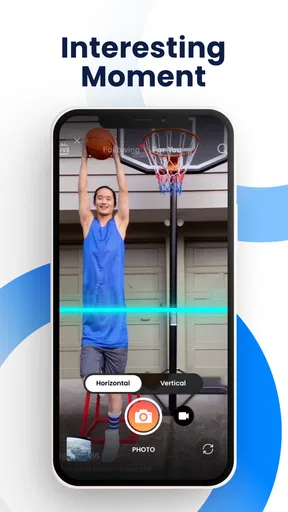
Once installed, you’re greeted with a straightforward interface that even your tech-averse friends can navigate. The main attraction here is the blue line effect, which you can apply horizontally or vertically. This feature is what gives you those quirky, distorted images, perfect for a good laugh or a creative photo project.
Worth Reading Before You Choose

Baby Panda World Brings Quick Play to Modern Phones, but Its Game Library Feels Busy

ESPN’s Live Game View Makes Following Close Games Easier

QuizzLand Review: A Good Fit for Short Trivia Breaks, Not Every Player

Basketball Stars: Multiplayer Is Fast, but Can It Recover When Matches Go Wrong?

WEBTOON Turns Phone Updates Into a Better Reading Routine

Link to Windows Runs on Shared Habits, Not Social Feeds
Unleashing Your Creativity
Here’s where the fun begins. You can use the time warp feature to create all sorts of amusing content. Want to see what you’d look like with a stretched face or a funky new hairstyle? This app has you covered. The key is timing. You have to move just right as the blue line scans across your screen. It’s all about experimenting and finding the perfect moment to freeze.
I found myself experimenting with different objects and even pets. Watching my dog’s nose stretch into what seemed like infinity was pure comedy gold. The possibilities are endless, and once you get the hang of it, you’ll be crafting viral-worthy content in no time.
One useful way to improve a take is to change only one variable between attempts. Keep the same subject and movement, then switch the scan direction; after that, try the other direction with the same action. This makes it easier to understand how the line changes the result, rather than relying on luck. I’d also keep the movement simple at first: a gradual turn or a slow hand motion is easier to judge than a quick gesture that passes before you can see what the scan has captured.
For an everyday example, imagine friends waiting for food at a casual get-together. Instead of asking everyone to pose for another ordinary group selfie, I’d have one person make a slow expression while someone else tries a small movement in the background. The first few results can be throwaways, but the group can immediately suggest a different expression or direction to test. That quick feedback loop is where this app feels most at home: it turns a short idle moment into a shared joke without needing a planned shoot.
Features That Stand Out
While the main highlight is the time warp feature, the app also offers a few nifty tools to enhance your creations. It comes with basic editing options to adjust brightness, contrast, and even add filters to your images. These tools are great for giving your warped images that extra pop before sharing them with friends.
Speaking of sharing, the app makes it super easy to post your masterpieces directly to social media platforms. Just a few taps, and your latest creation is ready to entertain your followers.
I’d treat those finishing tools as light touch-ups, not as a full editing suite. Adjusting brightness or contrast can help a distorted image read more clearly, especially if the face or object is hard to distinguish, while a filter can set a more playful mood. But if I want precise retouching, layered edits, or careful color work, I’d move the result into a dedicated editor. The effect is the reason to open this app; the extra adjustments are useful for presentation, not a substitute for deeper editing.
A small workflow tip: decide whether the result is meant to be a still image or a short social post before you start. That keeps the framing and movement focused on the moment you want people to notice. I’d review the capture before sharing rather than posting the first attempt automatically; a scan can create an amusing distortion, but it can also obscure the subject or catch an awkward expression. Choosing the clearest funny result is usually better than sharing every experiment.
Where it fits among camera and editing apps
Compared with a standard camera app, this one is less about dependable everyday photography and more about a specific visual trick. A camera app is the better choice when I need a straightforward picture of a person, place, or occasion. A general editing app is more flexible when I already have a photo and want to adjust it afterward. Here, the distinctive part happens during the scan, so the timing and movement are central to the result.
That focus is both its strength and its limit. If I’m looking for a quick, recognizable effect to try with friends, opening a dedicated tool can be simpler than searching through a broad editor’s menus. If I want many different styles, detailed controls, or a reliable way to improve ordinary portraits, a larger camera or editing app will suit me better. I wouldn’t install this expecting it to cover every photography need; I’d use it as a playful addition to the tools I already reach for.
It’s also worth remembering that a viral-looking effect does not guarantee a shareable result. The funniest capture may depend on the person’s expression, the direction of movement, and whether the scan crosses the subject at the right moment. I’d approach it as a small creative challenge, not a one-tap generator. That expectation makes the occasional failed attempt feel like part of the process rather than a flaw that ruins the app.
What Makes It a Must-Download?
Let’s talk usability. The app is smooth, with no annoying ads that interrupt your creative flow. It’s perfect for quick entertainment, whether you’re waiting in line or just lounging at home. Plus, it’s a hit at parties. Everyone loves gathering around to see who can create the funniest or weirdest photo.
It’s worth noting that while the app is free, there are some in-app purchases available. These are mainly for extra features and effects, but honestly, the free version is packed with enough fun to keep you entertained for a while.
It is a free photography app from Braly JSC, and its audience is broad: the age rating is Everyone. The app has a 4.2 average from around 37,000 ratings, with over 10 million installs, so it has clearly found an audience for this kind of quick visual play. I’d still judge it by what I want to make rather than popularity. Someone who rarely shares playful photos may have little reason to keep it, while a person who likes testing social effects can get value from returning to it whenever a new idea comes up.
There are in-app purchases ranging from $0.49 to $9.49 per item. I’d start with the free experience and see whether the core scan effect holds my interest before paying for anything. The practical question is not whether an extra option sounds appealing, but whether it changes the kind of photo I can make often enough to matter. If I only want to try the effect once or twice, spending is easy to avoid; if I use the app regularly, I can decide later whether an added option is worthwhile.
The app was released on March 4, 2022, and its current version is 3.7.4, with Android 7.0 as the minimum operating system requirement. Those details matter most when checking whether an older phone can run it. On a compatible device, I’d keep the camera steady and give the subject enough room in the frame; crowded framing can make a distortion harder to read, while a little space around the face or object makes the scan’s result clearer.
The Final Verdict
So, what’s the bottom line? Time Warp Scan - Face Scanner is a delightful blend of simplicity and fun. It’s great for breaking the ice at gatherings or just spicing up your social media feed. Whether you’re a seasoned social media influencer or just someone looking for a good laugh, this app is worth checking out.
In a world where apps come and go, this one stands out by offering something genuinely different and entertaining. So go ahead, download it, and let the hilarity ensue! You might just find yourself the star of the next viral trend.
My recommendation is strongest for people who enjoy making casual, expressive content and don’t mind a few imperfect attempts on the way to a good result. It gives you a focused effect, simple orientation choices, and enough basic finishing options to prepare a playful image for sharing. I’d skip it if I mainly need dependable portraits, comprehensive editing, or a tool that makes every capture look polished without experimentation. For everyone else, it’s an easy app to try for a laugh, and the best results come when you treat the scan as a creative prompt rather than expecting it to do all the work.
Pros
- Fun and engaging for all ages.
- Simple interface for easy use.
- Creative filters spark imagination.
- Quickly share results on social media.
- No account needed to start scanning.
Cons
- Limited free features available.
- Ads can interrupt the experience.
- Occasional lag on older devices.
- In-app purchases can be pricey.
- Needs internet for some features.
FAQs for Time Warp Scan - Face Scanner
What is Time Warp Scan - Face Scanner, and how does it work?
Time Warp Scan - Face Scanner is a fun and creative app that allows users to apply a moving filter to their photos and videos, creating unique visual effects. When activated, the app scans across the screen, capturing and freezing parts of the image, resulting in quirky distortions and artistic outputs. It's perfect for social media content creation or just having a laugh with friends.
Is Time Warp Scan - Face Scanner safe for all ages?
Yes, Time Warp Scan - Face Scanner is generally safe for all ages. The app is designed to be user-friendly and entertaining for everyone. However, as with any app, parental guidance is advised for younger users to ensure they are using it appropriately and not sharing personal information online.
What are the main features of Time Warp Scan - Face Scanner?
The app includes several key features such as vertical and horizontal scan options, adjustable scan speed, and the ability to save and share your creations directly to social media platforms. Users can also explore a variety of creative filters and effects to enhance their photos and videos even further.
Are there any in-app purchases in Time Warp Scan - Face Scanner?
Yes, Time Warp Scan - Face Scanner offers in-app purchases. While the basic features are free, users can purchase additional filters, effects, and an ad-free experience. These purchases enhance the app's functionality and provide a richer user experience, but they are entirely optional.
Does Time Warp Scan - Face Scanner require an internet connection to function?
No, Time Warp Scan - Face Scanner does not require a constant internet connection to function. Users can enjoy the basic features offline. However, an internet connection is necessary for downloading updates, accessing online content, or sharing creations directly from the app to social media.


